
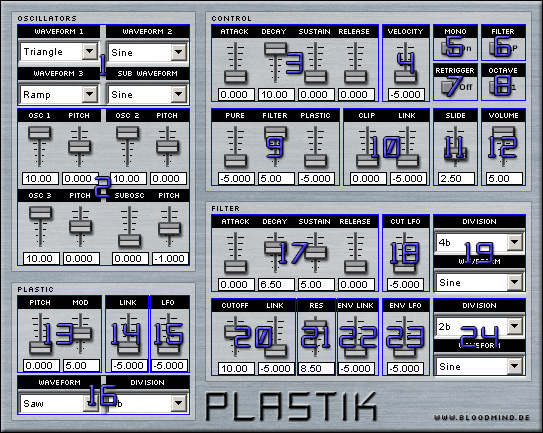
| 1. Here you can select the waveforms being used by the 4 Oscillators. | 2. Here you can adjust the volume and pitch of each Oscillator. The Subosc has an "overdrive" function, if you turn it up above 10.0. A nice demonstration of this effect can be heard in the preset "Acid String". |
3. These are the attack, decay, sustain and release sliders, see graphic for explanation.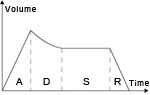 |
4. Here you can adjust the velocity of the synth. |
| 5. This knob switches between monophonic (1 voice) and polyphonic mode. | 6. This knob selects the filter being used. "Low Pass" (LP) cuts off high frequencies and "High Pass" (HP) cuts off low frequencies. |
7. The "retrigger" switch controls if slides are possible or not. | 8. The "octave" switch selects the octave the synth is in. |
| 9. These 3 sliders control the mix between the pure, the filtered and the plasticised signal. | 10. The "clip" slider will cause the sound to overdrive and the "link" slider links the velocity to the overdrive. | 11. This slider controls the length of the slide between 2 notes. | 12. Here you can adjust the overall volume of the VST. |
| 13. The "pitch" slider controls the pitch of the effect and the "mod" slider controls the modulation. | 14. This slider links the velocity to the pitch & modulation of the plastic effect. | 15. This slider controls the amount of the pitch & modulation LFO. | 16. Here you an adjust the speed and waveform of the pitch & modulation LFO. |
| 17. These are the attack, decay, sustain and release sliders for the filter. | 18. This slider controls the amount of the cutoff LFO. | 19. Here you can adjust the speed and waveform of the cutoff LFO. | 20. The "cutoff" slider controls the amount of cutoff and the "link" slider links the velocity to it. |
| 21. This slider controls the amount of resonance. | 22. This slider links the velocity to the decay of the filter. | 23. This slider controls the amount of the envelope LFO. | 24. Here you can adjust the speed and waveform of the envelope LFO. |
Click here for the interactive version.
(C) www.bloodmind.de - Javascript effect by Bosrup.com