
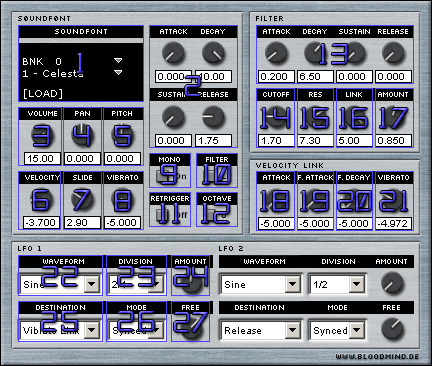
| 1. Use "LOAD" to load a Soundfont into the Synth. BNK chooses the Soundbank and the selection below it, the preset of the Soundfont. | 2. These are the attack, decay, sustain and release controls, see graphic for explanation.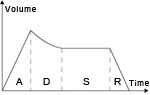 |
3. Here you can adjust the master volume. |
4. Here you can adjust the panning. |
| 5. Here you can adjust the pitch. | 6. Here you can adjust the velocity of the synth. | 7. This knob controls the length of the slide between 2 notes. | 8. This knob controls the amount of vibrato (pitch modulation), link the mod wheel from your Midi keyboard to this. If you want precise control over the amount/speed, use a LFO and choose "pitch" as the destination. |
| 9. This button switches between monophonic (1 voice) and polyphonic mode. | 10. Here you can choose the filter type. |
11. The "Retrigger" switch controls if slides are possible or not. | 12. The "Octave" switch selects the octave the synth is in. |
| 13. These are the attack, decay, sustain and release sliders for the filter. | 14. This knob controls the amount of cutoff. | 15. This knob controls how much resonance the filter has. | 16. Here you can adjust how much the velocity links to the cutoff. |
| 17. Here you can mix between the filtered and pure signal. | 18. Here you can adjust how much the velocity links to the attack. | 19. Here you can adjust how much the velocity links to the filter attack. | 20. Here you can adjust how much the velocity links to the filter decay. |
| 21. Here you can adjust how much the velocity links to the vibrato. | 22. Here you can choose the waveform of the LFO. | 23. Here you can adjust the speed of the LFO, if you choose "Synced" at the mode option. | 24. This knob adjusts how much the LFO manipulates its destination. |
| 25. Here you can choose the destination of the LFO. | 26. Here you can choose if the speed of the LFO gets synced with the host speed or not. | 27 . Here you can adjust the speed of the LFO, if you choose "Free" at the mode option. |
Click here for the interactive version.
(C) www.bloodmind.de - Javascript effect by Bosrup.com